WooCommerce Spam & Fraud Protection Settings
The oopspam plugin provides deep WooCommerce integration that goes beyond basic spam detection. In addition to protecting registration, login, and checkout forms with the oopspam API, it includes a comprehensive set of anti-fraud features to protect your store from automated attacks, card testing, and fraudulent orders.
For an overview of what oopspam does for stores, see oopspam for WooCommerce.
Supported Forms
oopspam protects the following WooCommerce entry points:
- Registration form — Both standard and checkout registration
- Login form — Prevents automated login attempts
- Classic checkout — Pre- and post-order validation
- Block-based (Store API) checkout — Full support for WooCommerce Blocks
- Legacy API orders — Protection for orders created via the REST API
Spam & Fraud Protection Features
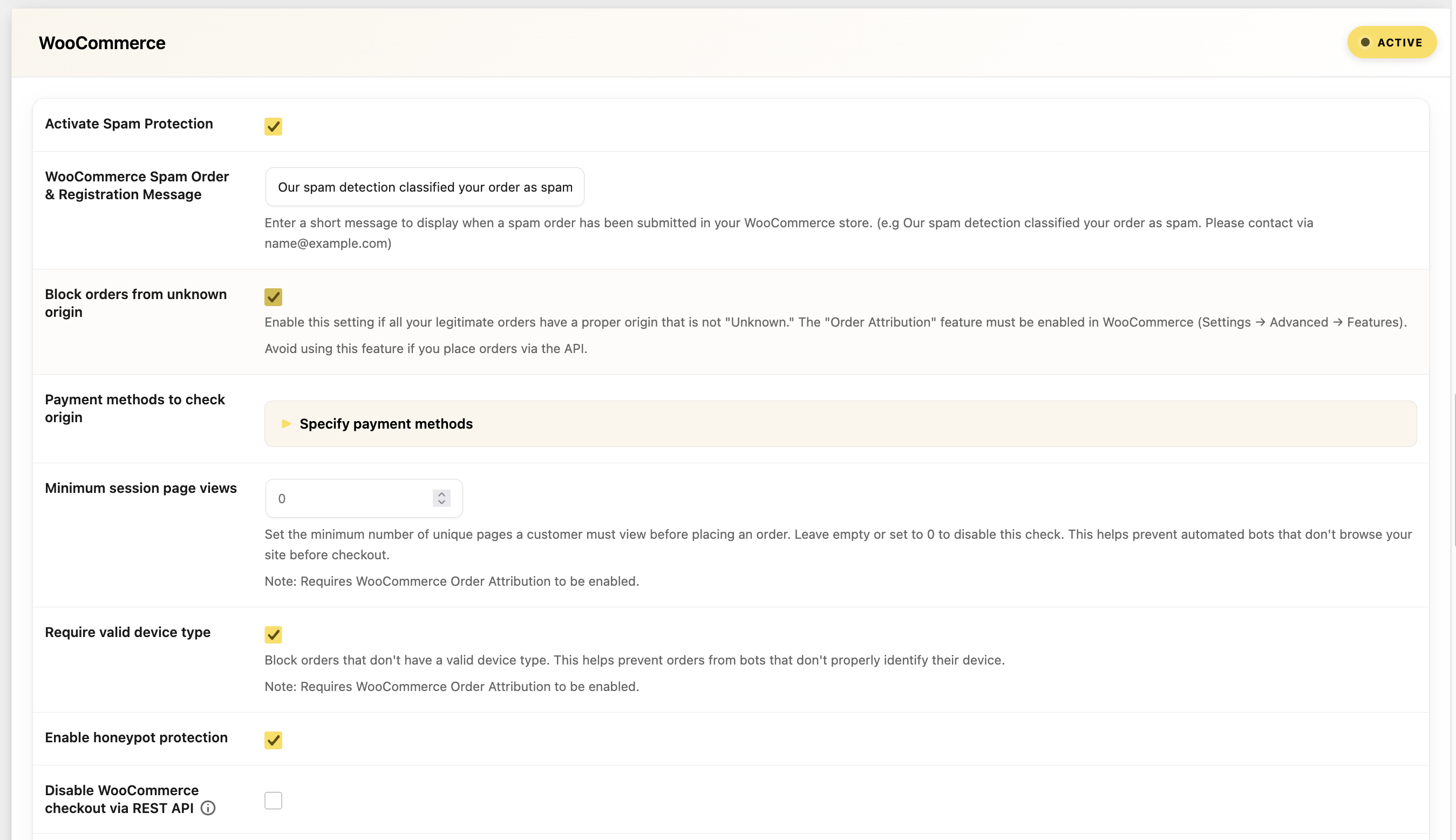
Honeypot Protection
Adds invisible hidden fields to registration, checkout billing, and login forms. Bots that auto-fill all form fields will trigger the honeypot, causing the submission to be blocked.
- Toggle: Enable in the WooCommerce settings section
oopspam_woo_disable_honeypot hook.REST API Checkout Blocking
Prevents automated spam orders placed through the WooCommerce REST API. When enabled, blocked requests are redirected to a 404 page and logged as spam.
- Toggle: Enable in the WooCommerce settings section
- Use case: Blocks bots and scripts that bypass the browser checkout flow
Order Origin Verification
When WooCommerce Order Attribution is enabled, this feature blocks orders that come from unknown or suspicious sources.
- Toggle:
Block orders from unknown origin - Payment Method Filter: Optionally restrict origin checking to specific payment methods only (e.g., only check orders paid via credit card)
Guide: How to stop failed orders with unknown origin in WooCommerce
Minimum Session Page Views
Requires customers to view a minimum number of pages before placing an order. This helps block bots that go directly to checkout without browsing.
- Setting:
Minimum session page views - Set to 0 to disable this check
Device Type Validation
Blocks orders from clients that don’t send a valid user agent — a strong indicator of automated scripts and bots.
- Toggle:
Require valid device type
Block Orders by Total Amount
Prevent fraudulent orders by blocking specific order total amounts. This is useful when you notice a pattern of test transactions at certain price points (common in card testing attacks).
- Setting:
Block orders with specific total amounts— one amount per line - Example: Enter
0.01,1.00,9.99to block orders with those exact totals - Returning customers with completed orders are exempt
Guide: How to block specific order amounts in WooCommerce
Block Orders by Billing Address
Block orders based on partial billing address matches. Useful for blocking known fraudulent addresses or suspicious patterns.
- Setting:
Block orders with specific billing addresses— one address per line - Returning customers with completed orders are exempt
Guide: How to block orders by billing address in WooCommerce
Card Testing Prevention
Two complementary features help prevent card testing attacks on your store:
Max Failed Payment Attempts:
- Setting:
Max failed payment attempts per IP - Window: Configurable time window in hours (default: 24 hours)
Repeated Same-Amount Orders:
- Setting:
Block repeated same-amount orders - Window: Configurable time window in hours (default: 1 hour)
- Returning customers with completed orders are exempt
Guide: How we blocked 450,000 card testing attempts in one week
Admin Order Actions
From the WooCommerce Edit Order screen, you can manually block or unblock orders:
- Block as Spam (oopspam): Reports the order to oopspam, adds the customer’s email and IP to your manual moderation block lists, and marks the order as blocked
- Undo Block (oopspam): Reverses the block — removes from block lists and adds to allow lists
Bulk Actions
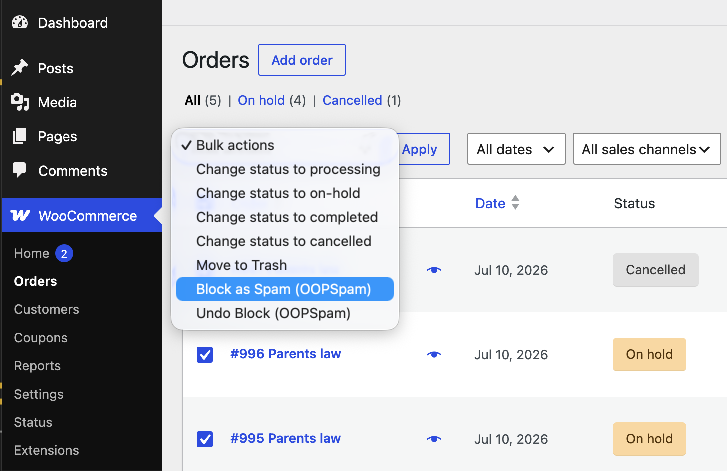
On the Orders list screen, you can apply these actions to multiple orders at once:
- Block as Spam (oopspam) — Bulk block selected orders
- Undo Block (oopspam) — Bulk undo block selected orders
Spam Message Customization
You can customize the error message displayed to users when their order is blocked. This is configured in the WooCommerce settings section under “WooCommerce Spam Order & Registration Message”.
Related guides
- How to protect your store from fake orders, card testing and checkout spam
- 5 ways to stop spam orders and registrations in WooCommerce
- How to block VPN and data center IP traffic in your WooCommerce shop
- Best fraud detection plugins for WordPress
Next
Explore more configuration options: